


Aximote: Car Data
4.812.00 Reviews
App Specs
- Version
- Varies with Device
- Updated On
- License
- Free
- Downloads
- 10,000+
- Developer
- Aximote
- Categories
- Auto & Vehicles
- Platform
- Android
Screenshots
 Analysis by AppCompare
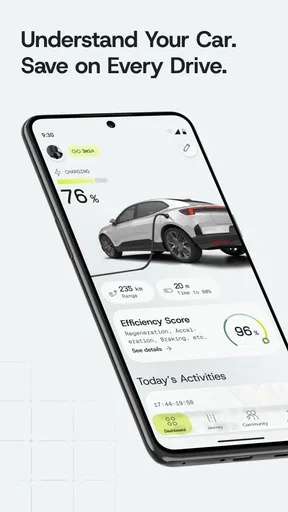
I approached Aximote: Car Data as a practical motoring companion rather than a flashy driving toy. It comes from Aximote and sits in the Auto & Vehicles category, with a clear focus on helping drivers understand where their money and time go. The central idea is simple: bring car costs, charging or fuel records, trips, and driving insights into one place instead of leaving them scattered across notes, receipts, and memory.
That focus makes the app interesting for people who want a better picture of everyday vehicle ownership. I can see the appeal immediately if you drive regularly, switch between fuel and electric vehicles, or simply want to know whether a car is becoming more expensive to run than expected. At the same time, this is not an app I would recommend automatically to every driver. Its usefulness depends heavily on whether you are willing to keep your records consistent and whether you want analysis rather than just navigation or vehicle diagnostics.
What Aximote: Car Data actually offers
The app is free to install and is rated for Everyone, which makes it easy to try without turning the first launch into a financial decision. Aximote has also made the app available for devices running Android 10 or later, so compatibility is something to check before downloading it to an older phone. The current audience is still relatively modest, with over ten thousand installs, but the app has built a strong average of 4.8 from several hundred ratings. That combination suggests a focused product that is connecting well with the people who choose to use it, rather than a mass-market utility that tries to serve every kind of driver.
The cost question needs a little care. Basic access is free, while in-app purchases range from $4.99 to $244.99 per item. Those figures do not by themselves explain which functions sit behind a purchase or whether a particular upgrade is useful for a given driver, so I would not treat the highest possible purchase as a reason to avoid the app. I would, however, open the purchase screen carefully and decide what I actually need before paying. The sensible approach is to use the free access first, build a small record of your driving, and judge paid value from the information you personally receive.
That is an important distinction from many car apps. A navigation app earns its place every time it finds a route, while a vehicle data tracker becomes more valuable gradually. Its results depend on a history of entries and trips. If you only open it once to look at a dashboard, you may not see much benefit. If you use it as a regular ownership log, patterns can become far more useful than isolated figures.
How I would use it during an ordinary week
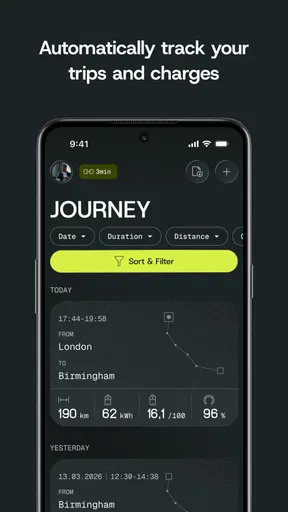
Imagine a normal week with a commute, a supermarket run, a family visit, and a longer trip at the weekend. Instead of treating each journey as a separate event, I would use the app to keep the vehicle’s running story together. Fuel or charging activity can be considered alongside trips and driving information, which gives the records more context than a fuel receipt alone. The useful question is not simply “what did I spend today?” but “what kind of driving caused that cost, and is that pattern changing?”
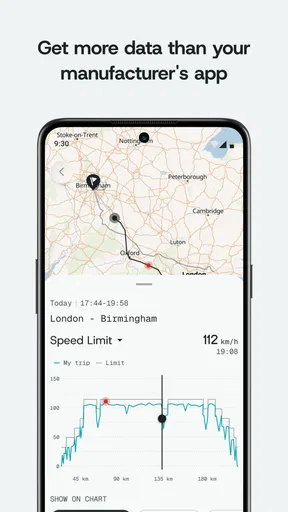
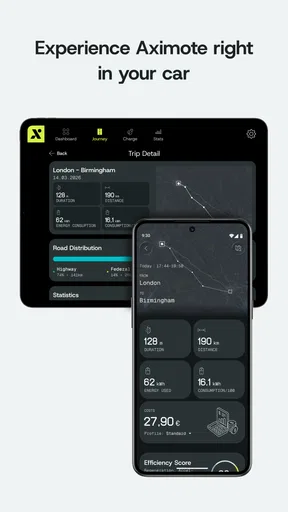
For example, a short urban commute can look cheap when viewed one trip at a time, yet become a major part of monthly vehicle spending because it happens so often. A longer trip may look expensive on one day but be reasonable when measured against the distance covered. Keeping trips and energy costs in the same app helps me make that comparison without reconstructing it later from bank statements and a phone calendar.
Worth Reading Before You Choose

EA SPORTS FC Mobile 26 Is a Bigger Football Game, but It Takes Time

Flipboard Shows What News Apps Must Do Beyond the Feed

Switching to Android Auto Means Rethinking Your Driving Routine

Google Calendar Makes a Crowded Week Easier to Manage

Ludo King Makes the Most of the Minutes Between Plans

Baby Panda World Brings Quick Play to Modern Phones, but Its Game Library Feels Busy
There is also a practical benefit when a household uses more than one car or when one person alternates between different types of driving. A consistent log can make it easier to separate personal journeys, routine commuting, and occasional long-distance use. I would not use the app as a substitute for official financial records, but it can provide a more driver-friendly view of the everyday decisions behind those records.
Where the driving insights can matter
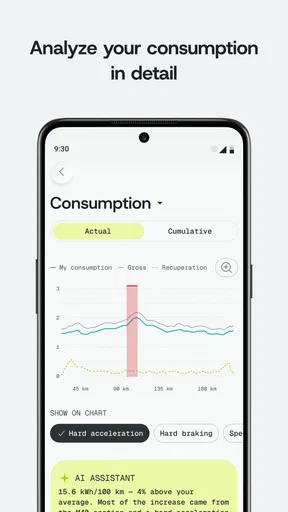
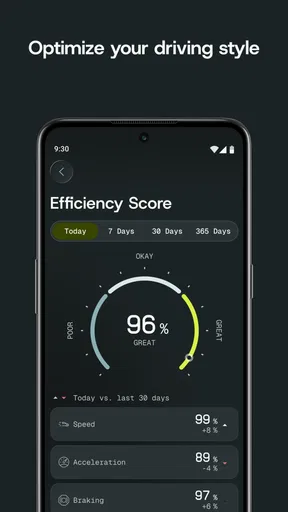
The phrase “driving insights” is broad, so I would keep my expectations grounded. The app’s strongest role is likely to be helping me notice relationships in my own data, not delivering a professional mechanical inspection. If the records show that costs rise during a particular routine, or that certain trips are repeatedly associated with higher fuel or charging use, that is already useful information. It can encourage a change in timing, route planning, vehicle choice, or travel frequency.
A helpful habit would be to review the app after several weeks rather than after every single entry. Daily checking can make small changes feel more important than they are. A periodic review gives the numbers enough context to reveal a pattern. I would compare similar types of journeys, such as weekday commuting with weekday commuting, rather than comparing a quiet local trip with a motorway journey and drawing a quick conclusion.
This is one of the more subtle strengths of a car-cost tracker: it can turn vague impressions into questions. I might think my car is suddenly using more energy, then discover that the recent period included unusually short trips. Or I might blame fuel prices for a higher total when the real change is simply that I drove more. The app cannot make that judgement for me, but a well-kept record gives me a better starting point.
Charging, fuel, and the discipline of good records
The inclusion of both charging and fuel makes the app relevant to more than one kind of driver. For an electric vehicle owner, charging costs can be spread across home charging and public charging, and those situations may feel very different financially. For a petrol or diesel driver, refuelling is often easier to remember because there is a clear transaction, but it can still be difficult to connect each purchase with the trips it supported. In either case, the value of the app depends on entering information in a repeatable way.
My advice would be to choose one moment for recording activity and stick with it. For fuel, that might be immediately after filling up. For charging, it could be when the session ends or when the payment appears. Waiting until the end of the month invites forgotten details and rough estimates. A rough record can still be better than no record, but it weakens the comparisons that make the app worthwhile.
There is a trade-off here that is easy to miss. A detailed log can produce better insight, but it also asks more from the user. Someone who wants everything to happen automatically may find this kind of app less satisfying than a connected vehicle service or a banking tool that categorises transactions. Someone who prefers control and wants car-specific context may accept the extra effort because ordinary spending apps rarely understand the difference between a commute, a road trip, and a charging session.
Trips are more useful when they answer a decision
I would not record trips merely to create a longer history. Before adding a journey, I would ask what I might want to learn from it. If the goal is to compare commuting costs, I would keep the commute records consistent. If the goal is to understand a new vehicle, I would record enough different driving situations to avoid judging it from one unusual week. If the goal is household budgeting, I would make sure the same types of costs are included each time.
This decision-led approach is a concrete way to avoid turning the app into busywork. It also helps when deciding whether a paid option is worthwhile. A purchase that makes a specific recurring task easier could have real value for a high-mileage driver. The same purchase may be unnecessary for someone who only wants an occasional estimate. Since the available purchase range is wide, I would be especially cautious about paying for convenience before I know how often I will use it.
Another useful workflow is to use the app before making a vehicle-related decision, not only after spending money. If I am considering a longer journey, I can look at my own past records for similar trips. If I am deciding whether a second car is justified, a history of actual usage may be more informative than a guess. The app cannot settle those choices on its own, but it can replace memory with evidence gathered from my driving.
Where it compares well with familiar alternatives
The usual alternatives each solve only part of this problem. A notes app is flexible and quick, but it leaves the driver to organise totals and interpret them. A spreadsheet can be more powerful, especially for someone who enjoys building formulas, yet it takes time to design and maintain. A banking app can show payments, but it usually cannot explain which trips or driving habits produced them. A vehicle manufacturer’s application may offer deeper information for a compatible car, but it can be tied to a particular brand, account, or connected system.
Aximote’s appeal is the middle ground. It is more focused than a blank note and potentially easier to maintain than a custom spreadsheet, while keeping attention on the car rather than general household spending. That makes it a good fit for an owner who wants meaningful records without building a personal accounting system. I would choose a spreadsheet instead if I needed complex reporting, shared editing, or complete control over calculations. I would choose a manufacturer’s connected service instead if automatic vehicle data mattered more than cross-car flexibility.
It is also not a replacement for a navigation app, a maintenance booking service, or a diagnostic scanner. Those tools answer different questions. Aximote is most useful when the question is about ownership patterns: what the vehicle costs to operate, how trips relate to that cost, and what the accumulated driving record suggests.
Friction points I would consider before paying
The first limitation is the human effort involved. A tracker can only be as reliable as the information put into it. Missed entries, mixed units, or inconsistent treatment of shared journeys can make the resulting picture misleading. I would treat the app as a personal log that improves with careful use, not as an unquestionable authority.
The second is that a high rating should not be confused with universal suitability. The average of 4.8 is encouraging, and the app has received ratings from hundreds of users, but people who enjoy it may already be the kind of drivers who value detailed vehicle records. A driver who wants instant, automatic results may have a different experience. Before spending money, I would test whether the free version fits my routine and whether I return to it naturally after driving.
The purchase range also creates a value question rather than a simple yes-or-no answer. The app costs nothing to start, which lowers the risk of trying it, but paid items can become expensive at the upper end. I would not buy based on the promise of having more data alone. I would pay only if a specific paid function saves enough time or improves a decision I make repeatedly. For occasional users, free access may be the complete answer; for drivers managing several vehicles or frequent travel, a paid option could be easier to justify if it directly supports that workload.
Finally, the app is relatively new, having been released on April 25, 2025. That is not a criticism, but it is relevant when I think about long-term confidence. A newer app may still be developing its workflows and expanding the ways people use it. I would keep my own essential receipts and records rather than relying on one app as the only copy of important information.
Who will get the most from it
I would recommend this app first to drivers who want to understand the real cost of regular travel. Commuters, electric vehicle owners comparing charging habits, families sharing a car, and people preparing for a vehicle change can all find a reason to keep a structured record. It is particularly useful for someone who has ever wondered why the monthly car budget keeps moving but never taken the time to connect spending with actual journeys.
It may also suit a careful used-car owner who wants to establish a baseline after buying a vehicle. The first weeks can create a reference point for normal use. That does not diagnose faults, but it can make unusual changes easier to notice. If costs or driving patterns shift later, having a consistent history is more helpful than trying to remember how the car behaved at the beginning.
I would skip it if I rarely drive, dislike manual tracking, or already receive all the information I need automatically from another trusted vehicle system. I would also look elsewhere if my main requirement is maintenance scheduling, live traffic, mechanical diagnostics, or detailed business mileage accounting. Those needs call for more specialised tools. Installing this app will not make an unsuitable use case suddenly fit.
For a small household, I would decide in advance who records each journey and how shared costs are handled. That single agreement can prevent the most common problem with personal tracking: two people entering information differently. The app becomes much more valuable when the records follow one simple rule instead of reflecting several competing habits.
My verdict on free access and paid value
My overall impression is positive because the app has a clear purpose and a useful combination of car costs, energy records, trips, and driving insights. The free entry point makes experimentation reasonable, while the Everyone rating keeps it approachable for a broad audience. Its strongest benefit is not a single dramatic feature; it is the chance to build a connected view of vehicle ownership over time.
I would start with the free version and use it through enough ordinary driving to see whether recording becomes part of my routine. I would then ask three practical questions: does it help me explain my spending, does it help me make a decision, and does it save more effort than a note or spreadsheet? If the answer is yes, a paid item may be worthwhile at the lower end of the purchase range, depending on the function offered. If the answer is no, paying more will not fix a lack of interest or inconsistent records.
My buy-or-skip verdict is buy for the curious, organised driver; skip for anyone seeking automatic diagnostics or a complete replacement for specialist car services. I would recommend giving Aximote: Car Data a fair free trial, keeping entries consistent, and judging it by the quality of decisions it helps you make rather than by the number of figures it collects. That is where this focused Auto & Vehicles app has the best chance of earning a permanent place on your phone.
Pros
- Tracks key vehicle data in one convenient mobile dashboard.
- Can help identify unusual readings before they become serious issues.
- Useful for monitoring driving habits and vehicle performance over time.
- Provides a practical alternative to checking basic data at a workshop.
- Suitable for drivers who want more visibility into everyday car behavior.
Cons
- Compatibility may depend on the vehicle
- adapter
- and supported data protocols.
- Some readings can be difficult to understand without automotive knowledge.
- Requires a compatible connection device for accessing car information.
- Live monitoring may increase battery use during longer driving sessions.
- Data accuracy can vary depending on the car’s sensors and onboard system.
FAQs for Aximote: Car Data
What is Aximote: Car Data and what does it do?
Aximote: Car Data is designed to help drivers view and manage vehicle-related information from a mobile device. Depending on the supported car, adapter, and connected services, it may provide access to data such as diagnostics, driving details, vehicle status, or other useful readings. Before downloading, check the app description and compatibility information carefully, because available features can vary significantly between vehicle models, operating systems, and connection methods.
Is Aximote: Car Data compatible with my vehicle and phone?
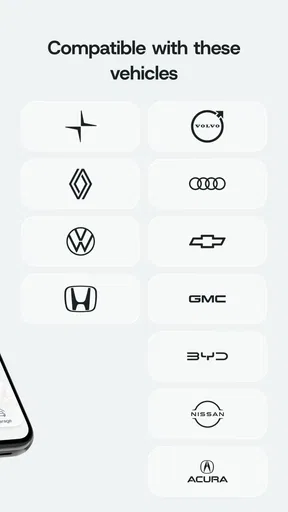
Compatibility is one of the most important things to verify before installing Aximote: Car Data. The app may require a specific vehicle system, hardware adapter, Bluetooth or another connection technology, and a supported Android or iOS version. Not every car exposes the same data, even when the app installs successfully. Review the developer’s compatibility list, required permissions, and any adapter recommendations before expecting full functionality.
Does Aximote: Car Data require additional hardware or subscriptions?
The application itself may not be enough to access all vehicle information. Some functions can depend on an external diagnostic device, a compatible interface, an active connected-car service, or a particular account. Certain advanced tools may also be restricted by a subscription, in-app purchase, or service plan. Check the current store listing and the app’s official documentation for costs and equipment requirements, since these conditions can change with updates.
What permissions and personal data does Aximote: Car Data use?
A vehicle-data application may request permissions for Bluetooth, nearby devices, location, notifications, storage, or network access, depending on how it connects to your car and saves information. These permissions can be necessary for communication and background features, but users should still review the privacy policy before granting access. Pay particular attention to whether driving records, vehicle identifiers, account details, or diagnostic information are collected, stored, or shared.
Is Aximote: Car Data safe to use while driving?
Aximote: Car Data should be configured before starting a journey and used only when the vehicle is safely parked. Vehicle readings, alerts, or diagnostic information can be useful, but interacting with a phone while driving creates a serious distraction and may be illegal. The app should not replace professional mechanical advice or emergency assistance. If a warning appears, stop safely and consult the vehicle manual or a qualified technician.


